6.13.1.1. Home tab

The home screen has buttons for frequently used functions.
- Application
- About this app:
Displays the logo of this application.
- Clear cache:
Deletes file open history and temporary files all at once.
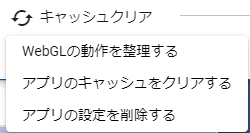
Organize the operation of WebGL
Check the behavior and clear unnecessary caches when WebGL gets stuck when you operate the HTML UI.
Clear the app cache
Delete all the data that is only temporarily stored in the app.
Delete app settings
Deletes all the settings shown in the app settings and restores them to their default state.
- Language selection:
Switch the UI language of this application. Some UI will be reflected after the next startup.
- Detailed information:
Displays information for the selected VRM.
- Load
- VRM:
Open and load VRM.
- Object:
Open and load FBX, OBJ, etc.
- Project
- Open:
Open an existing animation project file.
- Save:
Save the current animation project to a file. Equivalent to Save in this tab.
- History:
Displays a dialog to open each object (VRM, OtherObject, Image) once opened.
- capture:
Take a screenshot of the current WebGL screen and save it.
- Config:
Display the setting screen of this application.
- v-pad:
Displays the operation pad of the main camera.
- VR:
Switch to display in VR space with VR device.
- AR:
Switch to displaying in AR space with VR equipment.