6.22. Position and rotation reference
Introduced in version 2.15.0. You can refer to the position of an object other than the currently selected object and change the orientation or move to that object.In the case of VRM, you can move individual IK markers such as arms and gaze points toward the head or arms of another VRM, making it easier to direct poses with multiple VRMs. This window is an internal window, but it can also be displayed as a separate window depending on the settings.
Reference Avatar |
VRM |
Other than VRM |
Image |
|
|
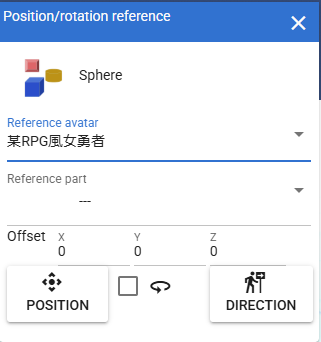
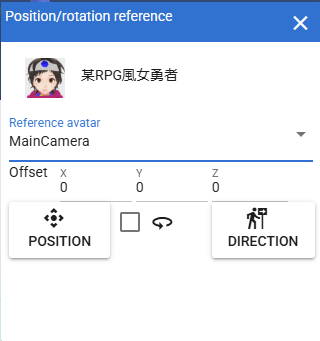
- The currently selected object:
The thumbnail and title are displayed.
- Reference Avatar:
A combo box for selecting other 3D objects.
Caution
The following cannot be selected:
2D Objects
Stage
BGM/SE
SystemEffect
- Reference part:
This can only be selected when the reference avatar is VRM. Select which part of the target VRM to reference the IK marker position.
- Offset:
When moving the currently selected object, you can specify an offset distance from the reference object.
- Position Button:
Actually moves the currently selected object or IK marker.
- Reverse pose:
If you want to change the orientation, this is a checkbox that allows you to flip the orientation along the Y axis.
- Direction button:
It actually rotates the currently selected object or IK marker toward the reference part of the reference avatar.